Tuesday, June 25, 2019

‘This is Your Life in Silicon Valley’: Former Pinterest President, Moment CEO Tim Kendall on Smartphone Addiction

Welcome to this week’s transcribed edition of This is Your Life in Silicon Valley. We’re running an experiment for Extra Crunch members that puts This is Your Life in Silicon Valley in words – so you can read from wherever you are.

This is Your Life in Silicon Valley was originally started by Sunil Rajaraman and Jascha Kaykas-Wolff in 2018. Rajaraman is a serial entrepreneur and writer (Co-Founded Scripted.com, and is currently an EIR at Foundation Capital), Kaykas-Wolff is the current CMO at Mozilla and ran marketing at BitTorrent. Rajaraman and Kaykas-Wolff started the podcast after a series of blog posts that Sunil wrote for The Bold Italic went viral.

The goal of the podcast is to cover issues at the intersection of technology and culture – sharing a different perspective of life in the Bay Area. Their guests include entrepreneurs like Sam Lessin, journalists like Kara Swisher and politicians like Mayor Libby Schaaf and local business owners like David White of Flour + Water.

This week’s edition of This is Your Life in Silicon Valley features Tim Kendall, the former President of Pinterest and current CEO of Moment. Tim ran monetization at Facebook, and has very strong opinions on smartphone addiction and what it is doing to all of us. Tim is an architect of much of the modern social media monetization machinery, so you definitely do not want to miss his perspective on this important subject.

For access to the full transcription, become a member of Extra Crunch. Learn more and try it for free. 

Sunil Rajaraman: Welcome to season three of This is Your Life in Silicon Valley. A Podcast about the Bay Area, technology, and culture. I’m your host, Sunil Rajaraman and I’m joined by my cohost, Jascha Kaykas-Wolff.

Jascha Kaykas-Wolff: Are you recording?

Rajaraman: I’m recording.

Kaykas-Wolff: I’m almost done. My phone’s been buzzing all afternoon and I just have to finish this text message.

Rajaraman: So you’re one of those people who can’t go five seconds without checking their phone.


from RSSMix.com Mix ID 8176981 https://techcrunch.com/2019/06/25/this-is-your-life-in-silicon-valley-former-pinterest-president-moment-ceo-tim-kendall-on-smartphone-addiction/
http://www.gadgetscompared.com
from Tumblr https://ikonografico.tumblr.com/post/185847059291
via http://www.gadgetscompared.com

FTC, Justice Dept. takes coordinated action against robocallers

Federal authorities have announced its latest crackdown on illegal robocallers — taking close to a hundred actions against several companies and individuals blamed for the recent barrage of spam calls.

In the so-called “Operation Call It Quits,” the Federal Trade Commission brought four cases — two filed on its behalf by the Justice Department — and three settlements in cases said to be responsible for making more than a billion illegal robocalls.

Several state and local authorities also brought actions as part of the operation, officials said.

Each year, billions of automatically dialed or spoofed phone calls trick millions into picking up the phone. An annoyance at least, at worse it tricks unsuspecting victims into turning over cash or buying fake or misleading products. So far, the FTC has fined companies more than $200 million but only collected less than 0.01% of the fines because of the agency’s limited enforcement powers.

In this new wave of action, the FTC said it will send a strong signal to the robocalling industry.

Andrew Smith, director of the FTC’s Bureau of Consumer Protection, said Americans are “fed up” with the billions of robocalls received every year. “Today’s joint effort shows that combatting this scourge remains a top priority for law enforcement agencies around the nation,” he said.

It’s the second time the FTC has acted in as many months. In May, the agency also took action against four companies accused of making “billions” of robocalls.

The FTC said its latest action brings the number of robocall violators up to 145.

Several of the cases involved shuttering operations that offer consumers “bogus” credit card interest rate reduction services, which the FTC said specifically targeted seniors. Other cases involved the use of illegal robocalls to promote money-making schemes.

Another cases included actions against Lifewatch, a company pitching medical alert systems, which the FTC contended uses spoofed caller ID information to trick victims into picking up the phone. The company settled for $25.3 million. Meanwhile, Redwood Scientific settled for $18.2 million, suspended due to the inability for defendant Danielle Cadiz to pay, for “deceptively” marketing dentistry products, according to the FTC’s complaint.

The robocalling epidemic has caught the attention of the Federal Communications Commission, which regulates the telecoms and internet industries. Last month, its commissioners proposed a new rule that would make it easier for carriers to block robocalls.


from RSSMix.com Mix ID 8176981 https://techcrunch.com/2019/06/25/ftc-justice-department-robocall-action/
http://www.gadgetscompared.com
from Tumblr https://ikonografico.tumblr.com/post/185847059086
via http://www.gadgetscompared.com

Monday, June 24, 2019

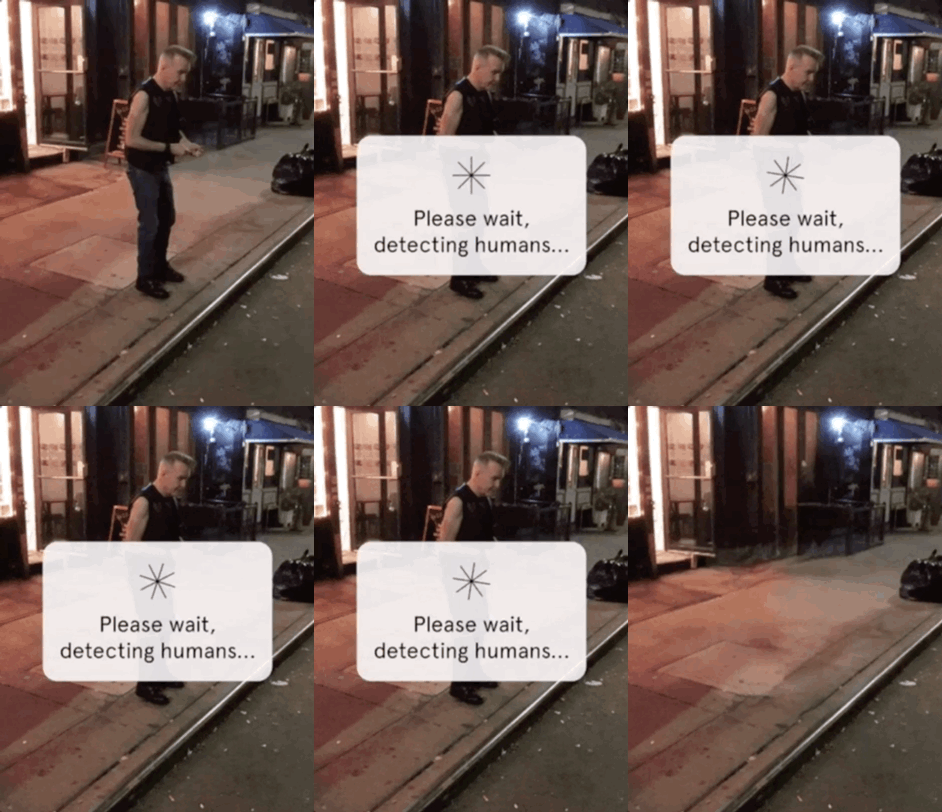
At last, a camera app that automatically removes all people from your photos

As a misanthrope living in a vibrant city, I’m never short of things to complain about. And in particular the problem of people crowding into my photos, whatever I happen to shoot, is a persistent one. That won’t be an issue any more with Bye Bye Camera, an app that simply removes any humans from photos you take. Finally!

It’s an art project, though a practical one (art can be practical!), by Do Something Good. The collective, in particular the artist damjanski, has worked on a variety of playful takes on the digital era, such as a CAPTCHA that excludes humans, and setting up a dialogue between two Google conversational agents.

The new app, damjanski told Artnome, is “an app for the post-human era… The app takes out the vanity of any selfie and also the person.” Fortunately, it leaves dogs intact.

Of course it’s all done in a self-conscious, arty way — are humans necessary? What defines one? What will the world be like without us? You can ponder those questions or not; fortunately, the app doesn’t require it of you.

Bye Bye Camera works using some of the AI tools that are already out there for the taking in the world of research. It uses YOLO (You Only Look Once), a very efficient object classifier that can quickly denote the outline of a person, and then a separate tool that performs what Adobe has called “context-aware fill.” Between the two of them a person is reliably — if a bit crudely — deleted from any picture you take and credibly filled in by background.

It’s a fun project (though the results are a mixed bag) and it speaks not only to the issues it supposedly raises about the nature of humanity, but also the accessibility of tools under the broad category of “AI” and what they can and should be used for.

You can download Bye Bye Camera for $3 on the iOS App Store.


from RSSMix.com Mix ID 8176981 https://techcrunch.com/2019/06/24/at-last-a-camera-app-that-automatically-removes-all-people-from-your-photos/
http://www.gadgetscompared.com
from Tumblr https://ikonografico.tumblr.com/post/185830581546
via http://www.gadgetscompared.com

Apple says Spotify exaggerated how much ‘App Store tax’ it pays

In March, Spotify filed a complaint against Apple with the European Commission over the so-called “Apple tax” and claims of restrictive rules regarding the App Store. In the time since, Apple has responded with the launch of a website that takes aim at the anti-trust, anti-competitive claims against it, and most recently, a deep dive into how the process of app approvals works, by way of a CNBC profile. Now, Apple has responded to the EC complaint with its own filing that says Spotify is only paying this “Apple tax” on less than 1 percent of its paid subscribers.

This news was first reported by Music Business Worldwide (MBW) and German site Der Spiegel.

Specifically, Apple’s filing says that Spotify only pays a 15% “app tax” (revenue share) on just 0.5% of its 100 million premium subscribers, or around 680,000 customers. This revenue share only impacts those customers Spotify acquired during the 2014-2016 time frame who signed up for the subscription through an in-app purchase. Afterward, Spotify switched off the option to sign up in the app.

This is in contrast to the claim made by Spotify CEO Daniel Ek on the company’s blog in March, where he wrote that “Apple requires that Spotify and other digital services pay a 30% tax on purchases made through Apple’s payment system.”

In addition, MBW reports, citing an unnamed source, that Spotify pays even less than the standard 15% for those customers who signed up through in-app purchase due to label discounts. The source told the outlet that Spotify just wants to “pay nothing.”

However, Spotify’s claim goes beyond the Apple tax.

It also said that Apple used its App Store power to penalize the competitor in other ways — like limiting Spotify’s ability to communicate with customers, or even send emails to its iOS users. Spotify said Apple also blocked its iOS upgrades — something it brought to light years ago. Apple, meanwhile, has always maintained it has treated Spotify like any other app developer.

Apple’s responses to these latter points were also sneaked into the recent CNBC piece where a “longtime Apple veteran” who was only identified as “Bill,” made certain to tell the news site that he had “called Spotify when an update was rejected” — e.g. because Spotify had been emailing customers and asking them to pay the music streamer directly outside the App Store.

In addition to Spotify’s EU complaint, Apple is facing other attacks against its App Store in the U.S. courts.

The U.S. Supreme Court in May ruled against Apple to allow an App Store antitrust case to proceed.

And in June, two app developers proceeded to sue Apple over its App Store practices, making similar claims about Apple’s 30% commission on app sales and its requirement to price apps in tiers ending in 99 cents.

Apple had earlier responded to Spotify’s complaint in length on its own website. The company, in part, said that:

After using the App Store for years to dramatically grow their business, Spotify seeks to keep all the benefits of the App Store ecosystem — including the substantial revenue that they draw from the App Store’s customers — without making any contributions to that marketplace. At the same time, they distribute the music you love while making ever-smaller contributions to the artists, musicians and songwriters who create it — even going so far as to take these creators to court.

…

Apple’s approach has always been to grow the pie. By creating new marketplaces, we can create more opportunities not just for our business, but for artists, creators, entrepreneurs and every “crazy one” with a big idea. That’s in our DNA, it’s the right model to grow the next big app ideas and, ultimately, it’s better for customers.


from RSSMix.com Mix ID 8176981 https://techcrunch.com/2019/06/24/apple-says-spotify-exaggerated-how-much-app-store-tax-it-pays/
http://www.gadgetscompared.com
from Tumblr https://ikonografico.tumblr.com/post/185828165581
via http://www.gadgetscompared.com

iOS 13 brings many much needed quality-of-life improvements

In developer lingo, quality-of-life updates are all about refining things that already work. Thanks to these incremental improvements, it should make the end user experience much more enjoyable. And with iOS 13, it feels like Apple’s main focus is on this concept.

Dark Mode is basically the only new flashy feature of iOS this year. But that’s not a bad thing. From my experience, all the tiny refinements across the board are really convincing. iOS 13 is a much more interesting release than iOS 12 for instance.

I’ve been playing with early beta versions of iOS 13, so here’s what you should be looking for.

Dark Mode is gorgeous

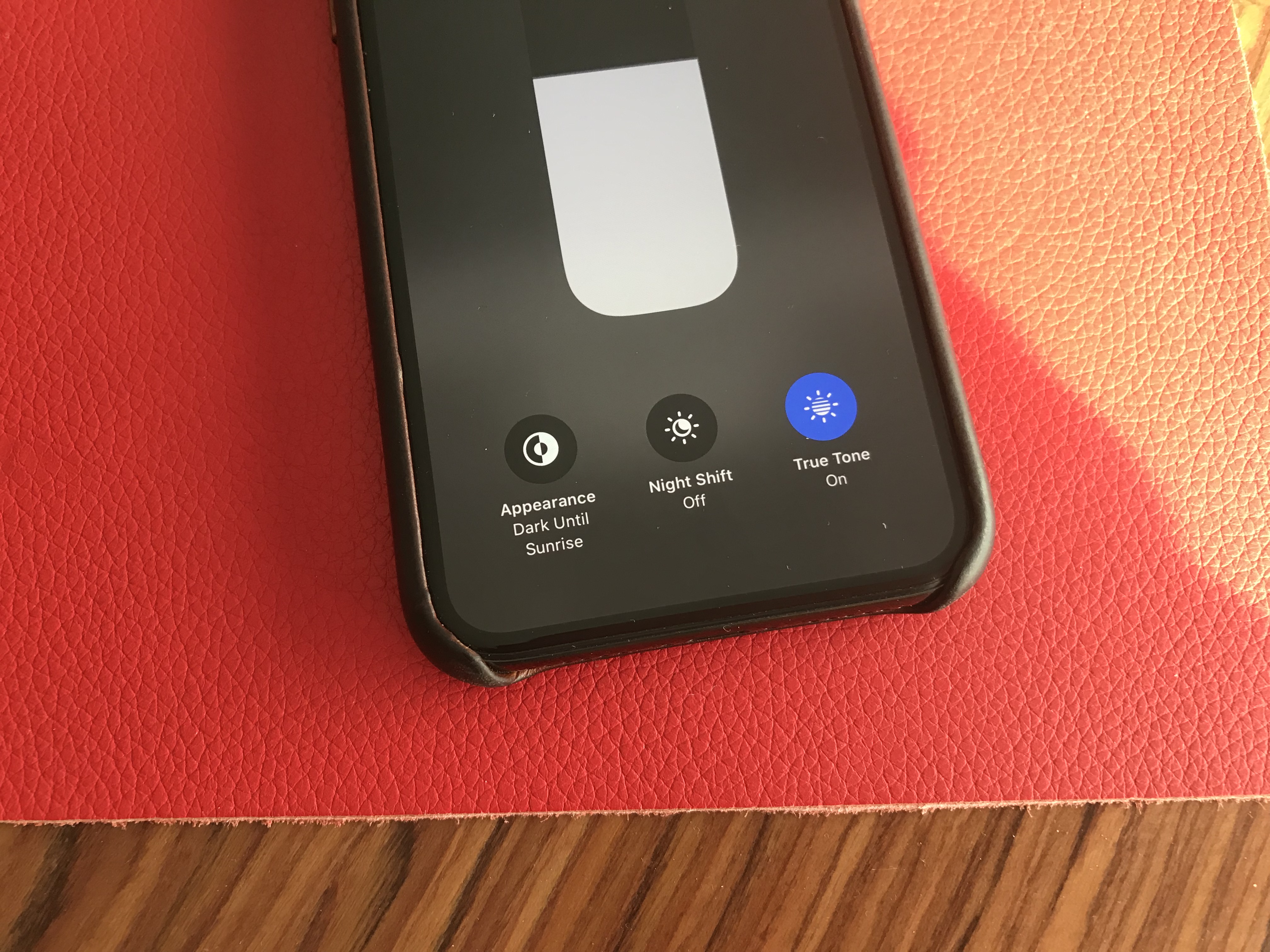
Dark Mode is here, and it looks great. It’s a system-wide trigger that completely transforms the look and feel of your iPhone — you have to play with it to really feel the difference. The easiest way to activate it is by opening the Control Center panel, long pressing on the brightness indicator and turning it on.

While you can trigger it manually, you can also select an automated mode in the settings. Right now, my phone becomes dark at night and lights up in the morning. iOS uses your current location to time the change with the sunset and sunrise.
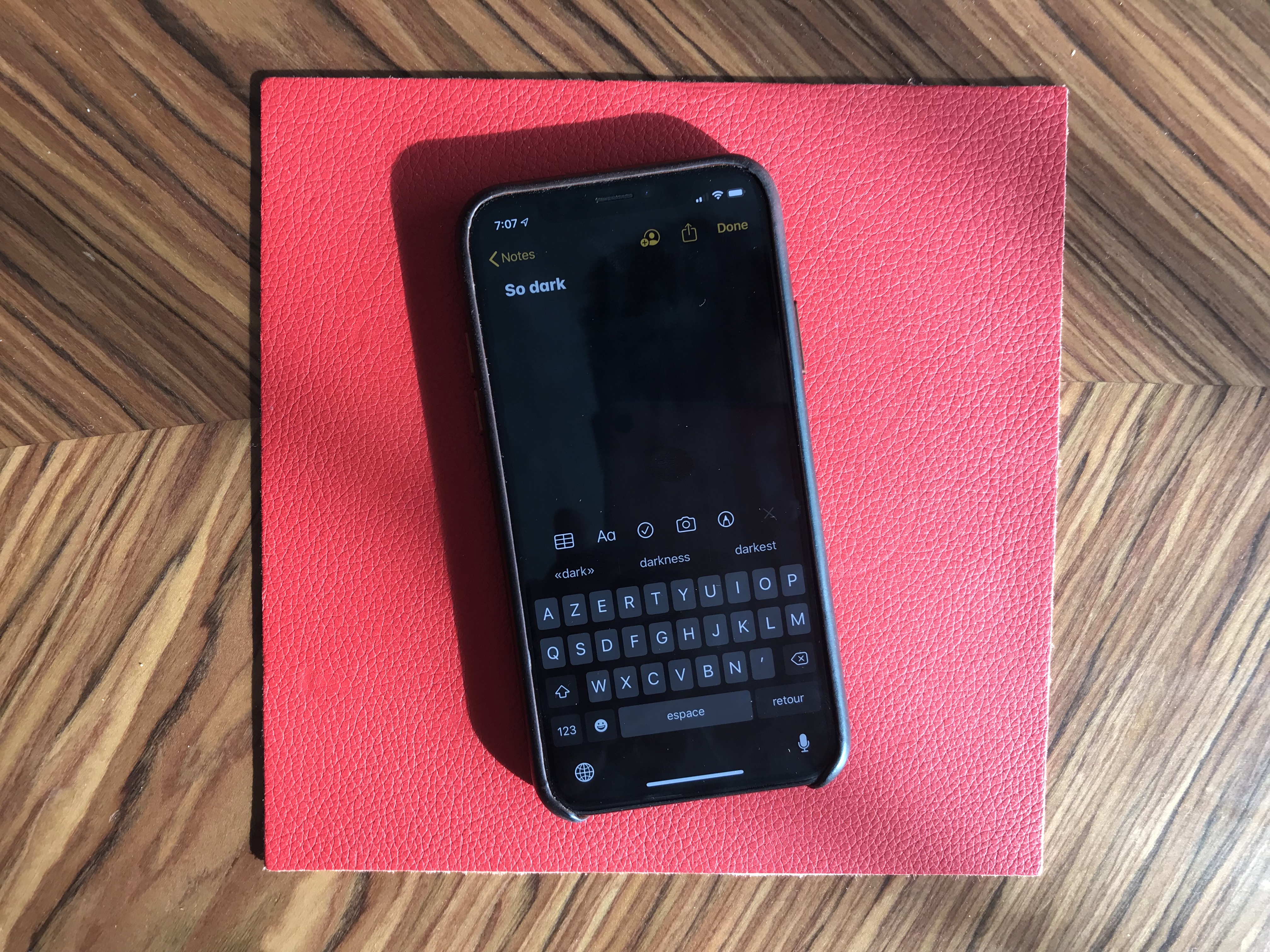
Widgets, notifications and menus now use black or transparent black as much as possible. You can choose new Apple wallpapers that change when you turn on Dark Mode, or you can optionally dim your custom wallpapers at night.

Apple has updated all its apps to support Dark Mode, from Notes to Mail, Messages, Safari and more. And it works really well with those apps.

But the issue is that many third-party apps haven’t been updated for Dark Mode yet. So it’s a disappointing experience for now, but I’m sure many app developers will update their apps before the final release of iOS 13.

Many apps already support have a dark version that you can trigger in the app settings. But Apple really wants third-party developers to follow the system-wide option going forward. So those apps will have to be updated as well.
Low-level improvements

iOS still looks like iOS. But if you carefully pay attention to your first experience of iOS 13, you’ll notice two things. First, animations have been sped up — it feels like unlocking your phone, opening and closing an app or swiping on a notification are much faster. It’s hard to know if those actions have been optimized or if it’s just Apple hitting the fast-forward button.

Second, Face ID is better. It’s not a dramatic change, but your phone recognizes you a tiny bit faster than before. iPhone users will appreciate that they don’t have to buy a new phone for this free improvement.

The two other iOS 13 changes that you can experience in any app is that the keyboard now supports swipe-to-type and the share sheet has been updated. It is now separated in three areas: a top row with suggested contacts to send photos, links and more depending on your most important contacts.

Under that row of contacts, you get the usual row of app icons to open something in another app. If you scroll down, you access a long list of actions that vary from app to another.

Siri and the Shortcuts app have been improved and now work more closely together. In addition to a more natural Siri voice, Shortcuts is now installed by default with iOS, which is great news for automation and scripting on your phone.

And I was surprised to see all my voice-activated Siri Shortcuts in the Shortcuts widget. For instance, since iOS 12, I’ve been able to say “Hey Siri, I’m heading home with Citymapper” to launch Citymapper with directions to my home. There’s now a button in the Shortcuts app to trigger that Siri Shortcut.

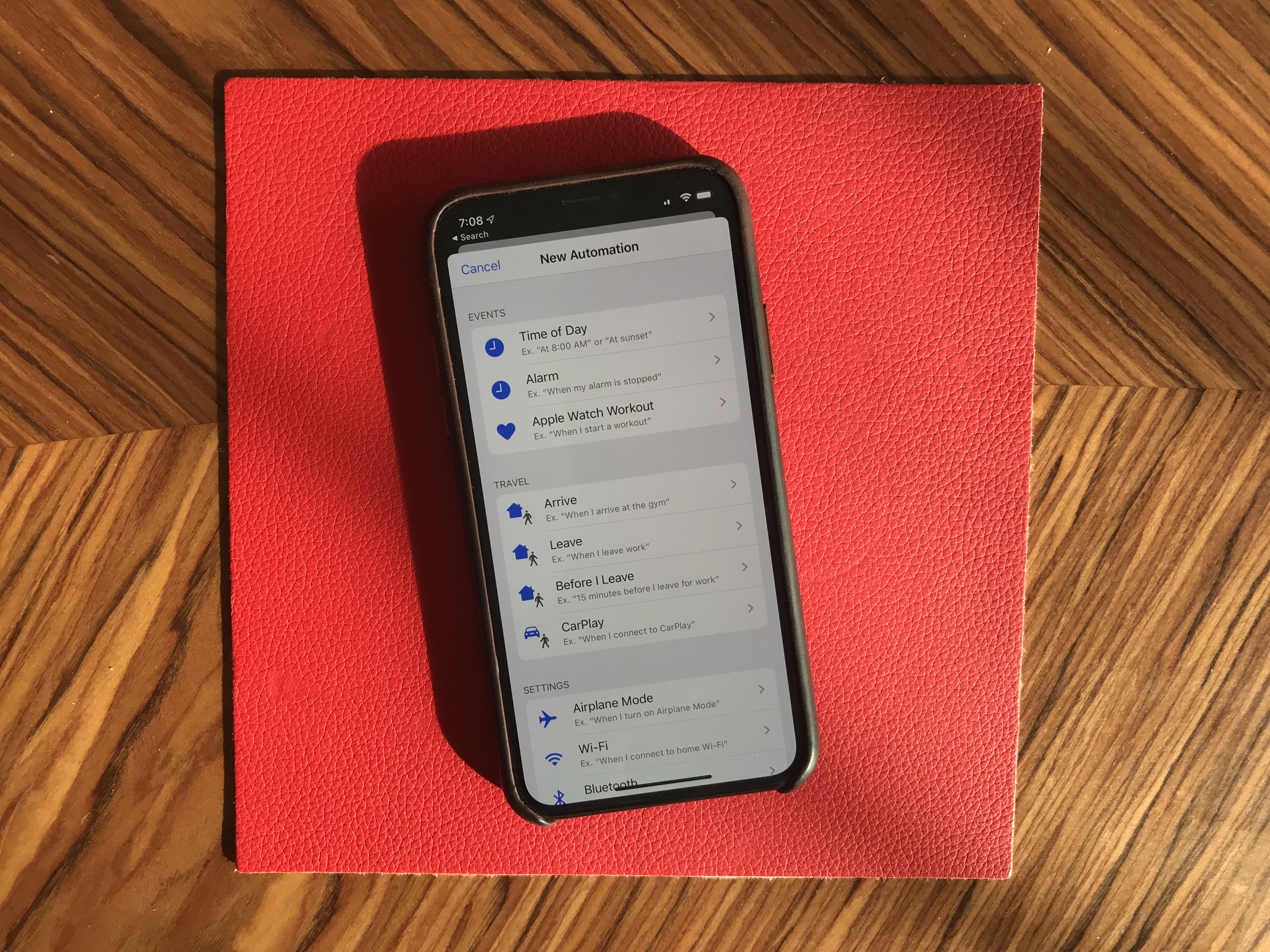
More interestingly, you can now create automated triggers to launch a shortcut. For instance, you can create scenarios related to CarPlay, a location or even a cheap NFC tag. Here are some examples:

  • Launch a music playlist when I connect my phone to CarPlay or to my car using Bluetooth.
  • Dim my screen and turn on low power mode when I activate airplane mode.
  • Turn off my Philips Hue lights when I put my phone on an NFC sticker on my nightstand.
App improvements

All first-party apps have been improved in one way to another. Some changes are small, but a few apps have received a massive update.

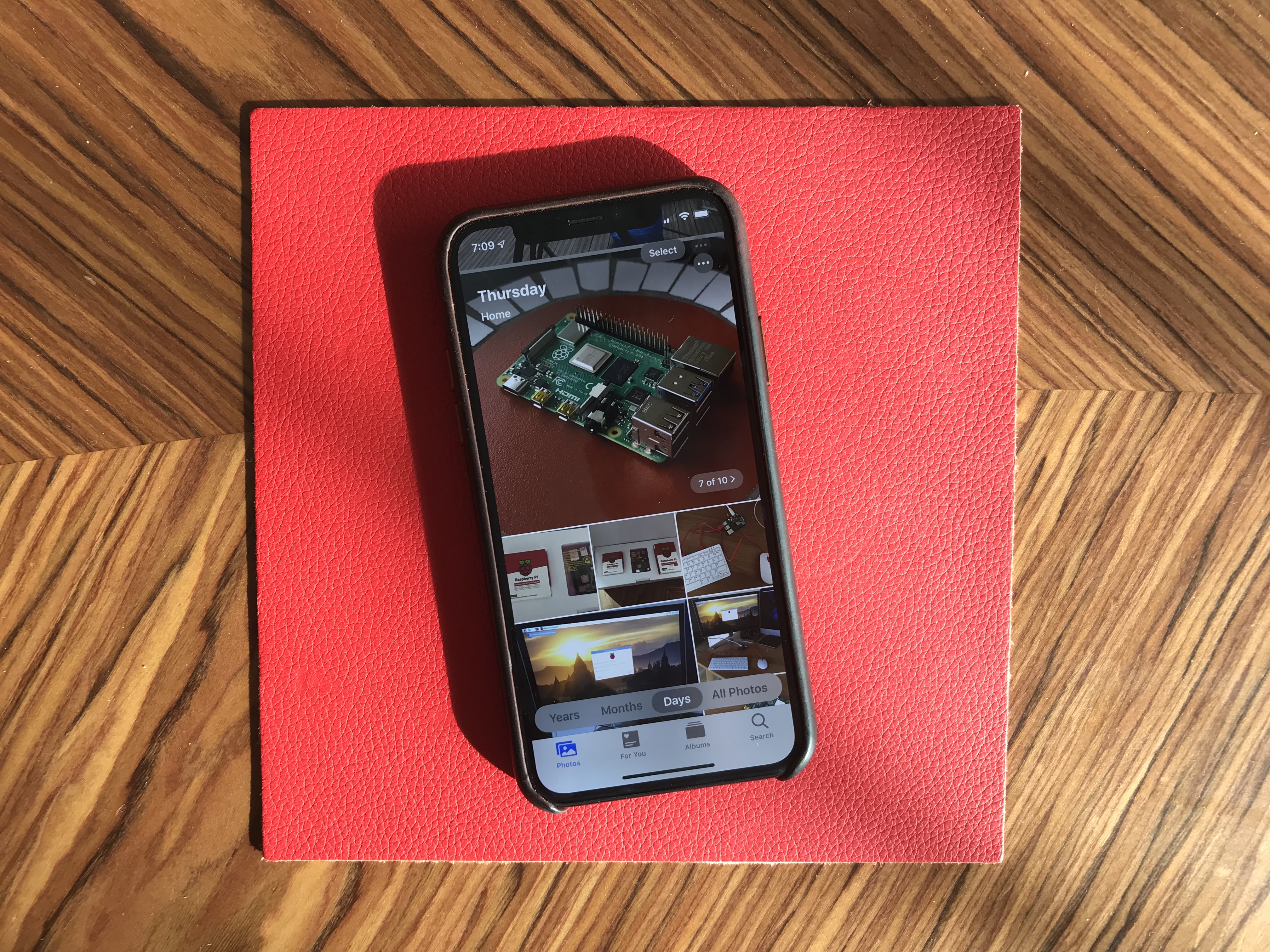
Photos looks completely different with a new main tab. Instead of relatively boring looking grid of photos, you now get four sub-tabs that should help you navigate your photo library more efficiently.

‘Years’ lets you jump straight to a specific year. The ‘Months’ view is the most interesting one as iOS tries to sort your photos in smart albums based on dates and locations. When you open an event, you get the best photos of this event in the ‘Days’ tab. Some photos, such as duplicates are hidden by default.

And the last tab, ‘All Photos’ features the traditional never-ending grid of all your photos in your camera roll. Everything is still there. Live photos and videos now automatically play by default in some views. I’ve never been a fan of autoplaying videos but I guess that’s what people like.

The camera has been slightly improved, especially when it comes to Portrait mode with better segmentation of hair. And photo editing has been redesigned — it looks more like VSCO now.
Maps is getting a gradual update with better mapping data. But most people won’t see any change for a while. You can see real-time transit data, your flight status and share lists of places with friends though. It might not replace Citymapper, FlightLogger or Mapstr, but more contextual data is key when it comes to competing with Google Maps.

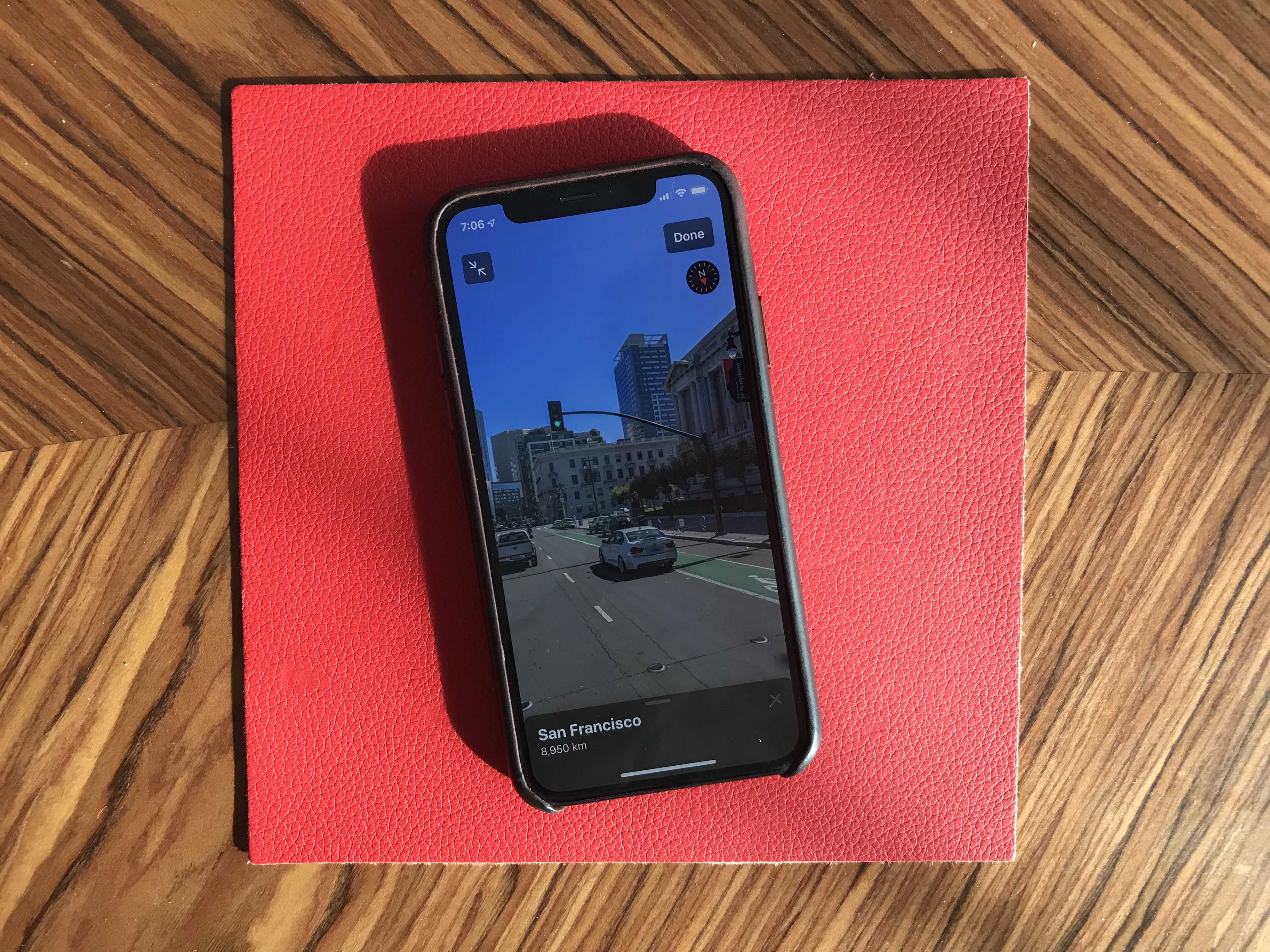
Talking about Google Maps, there’s a new Look Around feature that could have been called Apple Street View. I recommend trying the feature in San Francisco because it’s stunning. This isn’t just 360 photo shots — those are 3D representations of streets with foregrounds and backgrounds.
Messages is getting some much needed improvements. You can now choose a profile name and profile picture and share it with your contacts. I hate the default grey avatar, so it’s great to let people push a profile picture to other people.

If you have a Memoji-compatible device, you can now share Memoji stickers. If you’ve used Bitmoji in the past, this is Apple’s take on Bitmoji. And finally, search has been improved and is now actually useful. You can find an address or a specific message in no time.

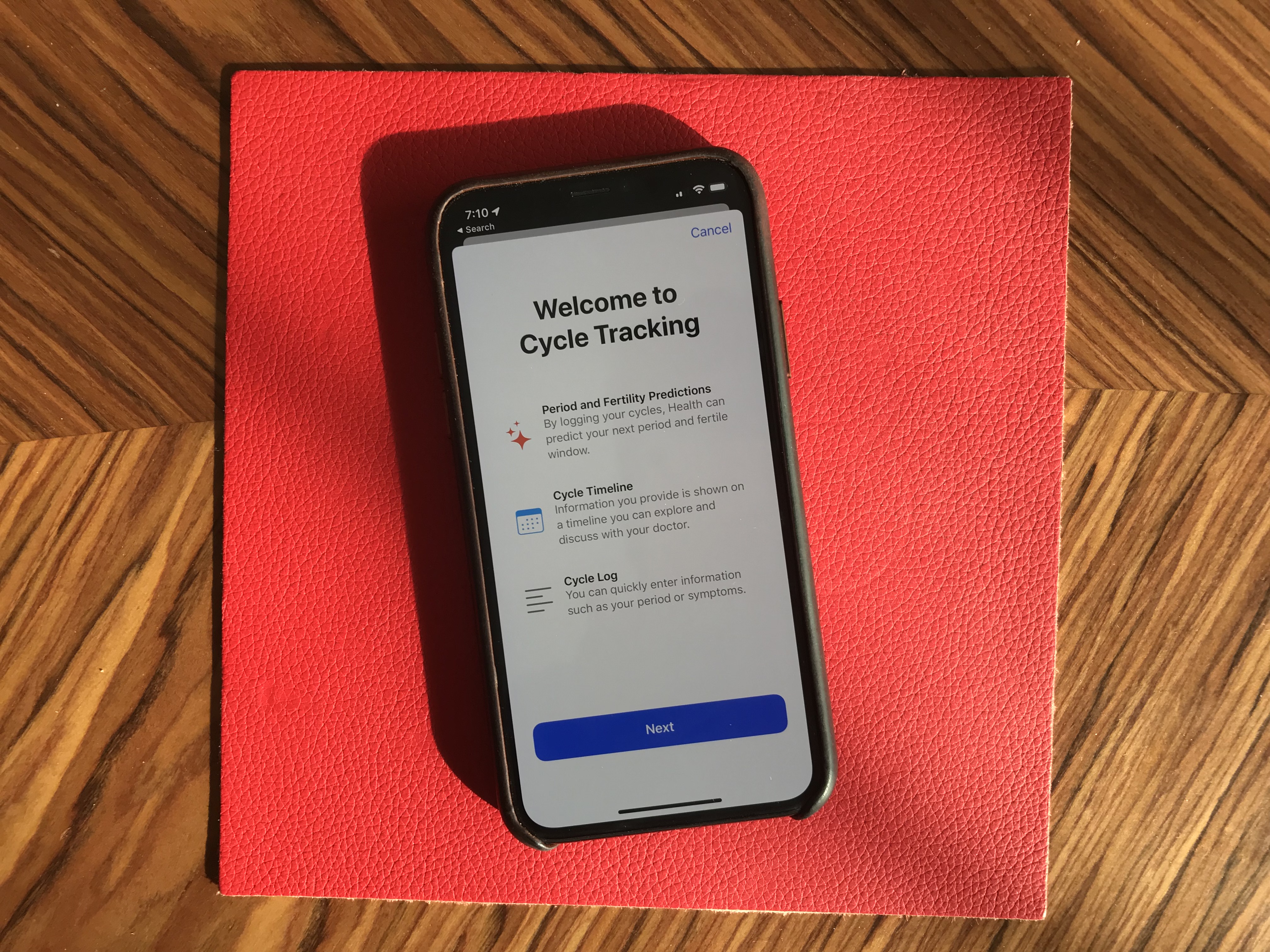
Health has been redesigned but features more or less the same data. But it’s worth noting that Apple now lets you track, visualize and predict your menstrual cycle from the Health app.
Privacy

iOS 13 has a big emphasis on privacy as well thanks to a new signup option called “Sign In with Apple”. I couldn’t try it as I couldn’t see the option in any app. But Sarah Perez already wrote a great explainer on the topic.

In a few words, this button will let you create an account for a service without inputing an email address and password, and without connecting with your Google or Facebook account. Apple keeps as little data as possible — it’s all about creating a unique identifier and storing that in your iCloud keychain.

Apple is adding more ways to control your personal information. If an app needs your location for something, you can now grant access to your location just once. The app will have to ask for your permission the next time. Similarly, iOS 13 can tell you when an app has been tracking your location in the background with a map of those data points.

But I didn’t realize iOS 13 also blocks Bluetooth scanning by default in all apps. Many apps scan for nearby Bluetooth accessories and compare that with a database of Bluetooth devices around the world. In other words, it’s a way to get your location even if you’re not sharing your location with this app.

You now get a standard permission popup for apps that actually need to scan for Bluetooth devices — Mobike uses Bluetooth to unlock bikes or Eve uses Bluetooth to interact with connected objects for instance. But the vast majority of apps have no reason to scan for Bluetooth devices. You can decline Bluetooth permission and use Bluetooth headphones normally.

Random tidbits

Let’s go through some tiny little updates:

  • App updates are smaller because iOS doesn’t download everything from their servers — only files that are relevant to your current device.
  • Files works with Samba file servers, and you can zip/unzip files.
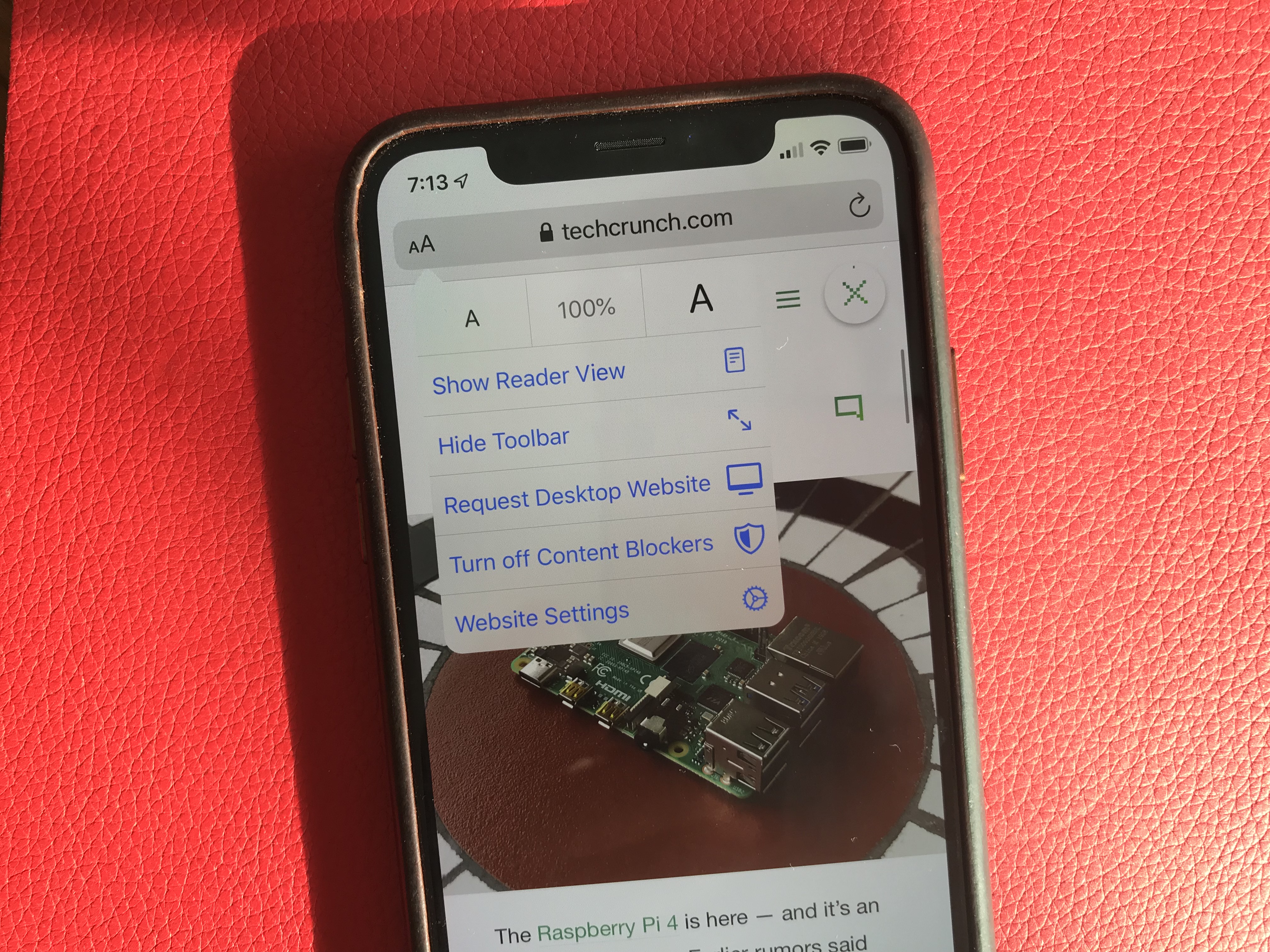
  • Safari features a new site settings popup to request the desktop site, disable a content blocker or enable reader view. This is much cleaner than before.
  • Notes has a new gallery view.
  • Mail lets you customize font style, size and color. You can also indent text, create bulleted lists, etc.
  • Find My iPhone and Find My Friends have been merged in a new Find My app. It also theoretically can help you find misplaced devices using other Apple devices from other people around your device — everything is supposed to be end-to-end encrypted.
Things I couldn’t try

  • CarPlay has been redesigned for the first time in years. But I don’t own a car.
  • You can store security camera footage in iCloud if your camera is HomeKit-compatible. But I don’t own a security camera.
  • ARKit has been improved and can detect people in the real world.
  • You can install custom fonts from the App Store and manage them from the settings. You can then use those fonts in any app.
  • Lyrics in the Music app now scroll just like in a karaoke. I haven’t tried that.
  • The Reminders app has been redesigned but I wasn’t using the app before. It feels like a full-fledged task manager now. Maybe I should use it.

Overall, iOS 13 feels like a breath of fresh air. Everything works slightly better than it used to. None of the changes are outrageous or particularly surprising. But they all contribute to making iOS a more enjoyable platform.


from RSSMix.com Mix ID 8176981 https://techcrunch.com/2019/06/24/ios-13-preview/
http://www.gadgetscompared.com
from Tumblr https://ikonografico.tumblr.com/post/185823509991
via http://www.gadgetscompared.com

Apple just released the first iOS and iPadOS 13 beta to everyone

This is your opportunity to get a glimpse of the future of iOS — and iPadOS. Apple just released the first public beta of iOS 13 and iPadOS 13, the next major version of the operating systems for the iPhone and iPad. Unlike developer betas, everyone can download those betas without a $99 developer account. But don’t forget, it’s a beta.

The company still plans to release the final version of iOS and iPadOS 13.0 this fall (usually September). But Apple is going to release betas every few weeks over the summer. It’s a good way to fix as many bugs as possible and gather data from a large group of users.

As always, Apple’s public betas closely follow the release cycle of developer betas. And Apple released the second developer beta of iOS and iPadOS 13 just last week. So it sounds like the first public beta is more or less the same build as the second developer build.

But remember, you shouldn’t install an iOS beta on your primary iPhone or iPad. The issue is not just bugs — some apps and features won’t work at all. In some rare cases, beta software can also brick your device and make it unusable. Proceed with extreme caution.

I’ve been using the developer beta of iOS and it’s still quite buggy. Some websites don’t work, some apps are broken.

But if you have an iPad or iPhone you don’t need, here’s how to download it. Head over to Apple’s beta website and download the configuration profile. It’s a tiny file that tells your iPhone or iPad to update to public betas like it’s a normal software update.

You can either download the configuration profile from Safari on your iOS device directly, or transfer it to your device using AirDrop, for instance. Reboot your device, then head over to the Settings app. In September, your device should automatically update to the final version of iOS and iPadOS 13 and you’ll be able to delete the configuration profile.

Here’s a quick rundown of what’s new in iOS 13. This year, in addition to dark mode, it feels like every single app has been improved with some quality-of-life updates. The Photos app features a brand new gallery view with autoplaying live photos and videos, smart curation and a more immersive design.

This version has a big emphasis on privacy as well thanks to a new signup option called “Sign in with Apple” and a bunch of privacy popups for Bluetooth and Wi-Fi consent, background location tracking. Apple Maps now features an impressive Google Street View-like feature called Look Around. It’s only available in a handful of cities, but I recommend… looking around as everything is in 3D.

Many apps have been updated, such as Reminders with a brand new version, Messages with the ability to set a profile picture shared with your contacts, Mail with better text formatting options, Health with menstrual cycle tracking, Files with desktop-like features, Safari with a new website settings menu, etc. Read more on iOS 13 in my separate preview.

On the iPad front, for the first time Apple is calling iOS for the iPad under a new name — iPadOS. Multitasking has been improved, the Apple Pencil should feel snappier, Safari is now as powerful as Safari on macOS and more.


from RSSMix.com Mix ID 8176981 https://techcrunch.com/2019/06/24/apple-just-released-the-first-ios-and-ipados-13-beta-to-everyone/
http://www.gadgetscompared.com
from Tumblr https://ikonografico.tumblr.com/post/185823509786
via http://www.gadgetscompared.com

Trash uses AI to edit your footage into a fun, short videos